Floral Frame Photo Template Design Guide
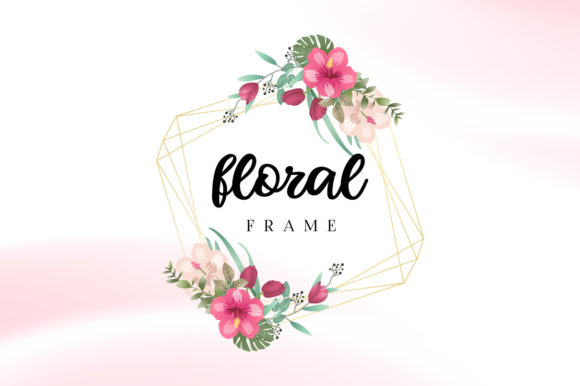
Elevating a simple photograph into a cherished keepsake or professional asset often comes down to presentation. A floral frame photo template design serves as more than just decoration; it provides context, emotion, and visual structure to an image. Whether you are framing a wedding portrait, designing product packaging, or creating educational materials, the right botanical border transforms how viewers perceive the content within. Understanding how to leverage these templates across different file formats ensures that your final output is both beautiful and technically sound.
Understanding the Value Across Different Roles
The utility of a floral frame extends far beyond aesthetic appeal. Different users approach these designs with distinct priorities, ranging from technical precision to emotional resonance. Recognizing where you fit in this spectrum helps in selecting the right template and utilizing the included files effectively.
For Professional Designers and Agencies
Creative professionals value efficiency without sacrificing quality. When working on tight deadlines for clients, building a complex botanical border from scratch is rarely feasible. Here, the AI (Adobe Illustrator) and EPS files become indispensable. These vector-based formats allow designers to scale elements infinitely without pixelation, adjust individual petal colors to match brand guidelines, and integrate the frame seamlessly into larger layout compositions. The priority here is flexibility and commercial reliability. A professional evaluates a floral frame photo template design based on layer organization, editability, and licensing terms rather than just visual style.
Small Business Owners and Marketers
Entrepreneurs and marketers often need high-impact visuals for social media, packaging, or promotional flyers but may lack advanced vector editing skills. For this group, the balance between customization and ease of use is critical. While they might appreciate having vector files for future print projects like business cards or box sleeves, their immediate needs are often met by high-resolution JPG and PNG files. Transparent PNGs are particularly valuable for overlaying frames onto product photography or Instagram stories using tools like Canva or Photoshop. The focus shifts from deep technical editing to speed, consistency, and presentation quality that enhances brand perception.
Educators, Hobbyists, and Personal Users
Teachers creating classroom certificates, scrapbookers preserving family memories, or individuals making DIY invitations prioritize accessibility and sentiment. Technical specs matter less than the emotional tone of the design. For these users, the pre-rendered JPG and PNG files offer a plug-and-play solution. There is no need to understand anchor points or vector paths when the goal is simply to place a beloved photo inside a beautiful watercolor wreath. The evaluation criteria here center on cost-effectiveness, ease of use, and whether the design evokes the right feeling for the occasion.
Navigating File Formats for Specific Outcomes
Receiving a package containing AI, EPS, JPG, and PNG files offers maximum versatility, but knowing which to use prevents frustration and ensures optimal results for print or digital display.
- AI (Adobe Illustrator): This is the source file for deep customization. Use this if you need to change the flower species, alter the composition significantly, or prepare large-format banners. It requires Adobe Illustrator software.
- EPS (Encapsulated PostScript): A universal vector format compatible with various design programs beyond Adobe. Ideal for sending to professional print shops or collaborating with other designers who use different software.
- PNG (Portable Network Graphics): Essential for digital work and layered printing. The transparent background allows the frame to sit over any color or texture without a white box appearing around it. Best for web graphics, overlays, and quick mockups.
- JPG (Joint Photographic Experts Group): A flattened, high-resolution image with a solid background. Perfect for direct printing at home, inserting into Word documents, or sharing as a standalone reference. Note that transparency is not supported in this format.
Matching Design Choices to Project Goals
Selecting the appropriate floral frame photo template design requires aligning visual style with functional intent. Not every botanical illustration suits every purpose, and understanding these nuances saves time during the creative process.
Print Production vs. Digital Display
If your primary goal is physical printing—such as wedding stationery, art prints, or packaging—resolution and color mode are paramount. You should rely on the vector AI or EPS files to ensure crisp edges at any size. Print design borders require careful attention to bleed areas and safe zones; a template with properly set margins prevents important floral elements from being trimmed off during production. Conversely, digital projects benefit from the optimized file sizes of PNG and JPG formats, where RGB color profiles ensure vibrant display on screens without the heavy processing load of vector data.
Commercial Branding vs. Personal Sentiment
Business applications demand restraint and alignment with identity. A minimalist line-art floral frame might convey modern elegance for a skincare brand, while a lush, vintage watercolor border could overwhelm a tech company’s clean aesthetic. Professionals must evaluate templates based on negative space availability for text and logos. In contrast, personal projects like anniversary gifts or memorial photos thrive on abundance and detail. Hobbyists and consumers can prioritize intricate, colorful designs that maximize emotional impact without worrying about corporate consistency or text legibility constraints.
Practical Considerations for Successful Implementation
Beyond aesthetics and file types, several practical factors determine whether a floral frame photo template design will serve your long-term needs.
Licensing and Usage Rights: Always verify what the license permits. A template perfect for a personal birthday card may not be cleared for use on merchandise sold in an Etsy shop. Professionals and business owners must distinguish between personal, commercial, and extended commercial licenses to avoid legal issues. Beginners and hobbyists should also check if attribution is required when sharing creations online.
Learning Curve and Skill Development: For those new to design, starting with PNG overlays builds confidence before tackling vector editing. However, investing time to learn basic AI or EPS manipulation unlocks greater long-term value. Being able to recolor a single template to match ten different client brands turns one purchase into an entire library of assets. Educators and students may find that exploring the layered structure of these files serves as an excellent introduction to graphic design principles.
Composition and Negative Space: A common pitfall is choosing a frame that competes with the photo rather than enhancing it. Evaluate the interior space critically. Dense, inward-facing florals work well for small portraits or text-heavy certificates but can crop out important details in landscape photos. Open, asymmetrical designs provide breathing room for dynamic compositions. Testing the frame with actual content before committing to a final design prevents costly reprint errors or wasted digital ad spend.
Making the Right Choice for Your Needs
Ultimately, the best floral frame photo template design is one that solves your specific problem efficiently. Ask yourself three questions before downloading or purchasing: What is the final output medium? How much customization do I realistically have time and skill for? Does this style authentically represent the message or memory I am conveying?
A freelance photographer might keep a collection of subtle PNG frames for quick client previews while maintaining AI files for premium album designs. A teacher might stick exclusively to bright, cheerful JPGs for classroom rewards. A marketing agency might standardize on editable EPS files to maintain cross-campaign consistency. By honestly assessing your role, resources, and objectives, you transform a generic template pack into a targeted creative tool that delivers lasting value regardless of your experience level.